

Your whole team,
one WhatsApp inbox.
Multiple agents. Shared conversations. Zero missed messages. Assign chats, add private notes, and see who's handling what — in real time.
Stop the inbox chaos
When multiple agents share one WhatsApp number, things break. BrightVon fixes them.
Built for
support teams
Every feature exists because a real support team asked for it. Nothing bloated. Nothing missing.
Shared Inbox
Every agent sees every conversation from one unified dashboard — no more forwarding screenshots.
Smart Assignment
Auto-assign based on skills, workload, or customer attributes. Or pick manually — your call.
Collision Detection
See when a teammate is typing. Preview who's viewing a chat before you jump in.
Internal Notes & @Mentions
Discuss a customer privately, tag teammates, and resolve without ever leaving the chat thread.
Agent & Team Analytics
Response times, resolution rates, CSAT — everything you need to run a great team.
Business Hours Routing
Auto-route to the right agent based on timezone, business hours, and availability.
Role-Based Security
Granular permissions, audit logs, and GDPR-ready data handling out of the box.
Designed for speed
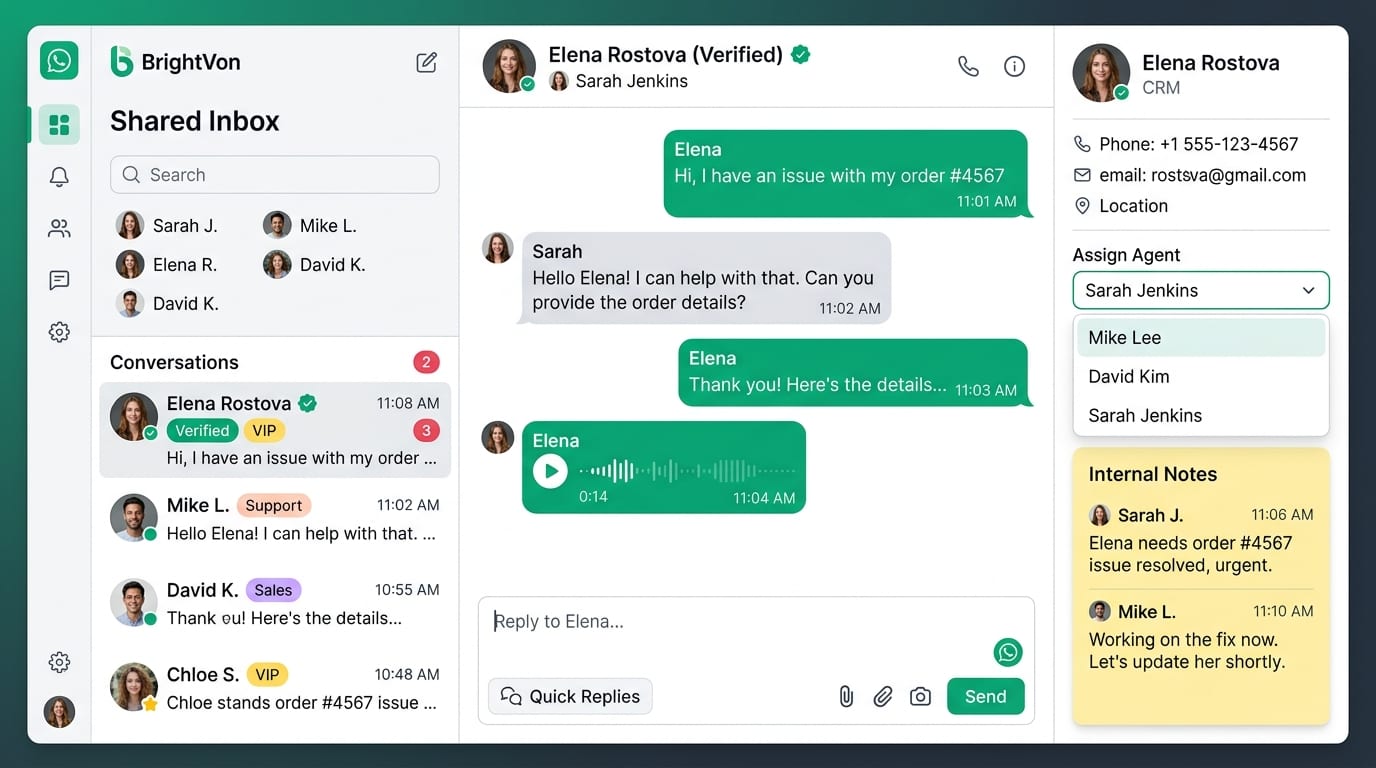
Three panels. One focus. Everything an agent needs is exactly where they expect it.
All conversations
Filter by status, team, or assigned agent. Unread chats float to the top.
Active chat
Full message history, customer profile, and quick actions right beside the conversation.
Internal tools
Private notes, tags, assignment controls, and CRM data — never visible to the customer.
Live in under 10 minutes
No IT ticket. No migration project. Connect, invite your team, and go.
Start Growing on WhatsApp
Go from your first message to your next customer
Connect
Set up your WhatsApp Business connection.
Create
Build campaigns, chatbots, and automated workflows.
Launch
Start engaging your customers.
Grow
Track results and optimize your conversations.
What changes when you switch
Real outcomes from teams running their support on BrightVon.

Faster response times
When every message is visible to the whole team and assigned automatically, nothing sits waiting. Average first response drops from hours to minutes.
- Auto-assignment on new conversations
- SLA timers on every thread
- Escalation rules for aging chats
- Real-time queue visibility
Happier customers, calmer agents
Customers get consistent, informed answers — regardless of who picks up the chat. Agents stop duplicating work and start focusing on real problems.
- Context transfers automatically
- Historical conversations visible
- Canned replies for common questions
- Internal notes for complex cases
Our response time went from 4 hours to under 2 minutes. BrightVon's shared inbox didn't just improve our support — it changed how our whole team operates.
Bring your team onto one inbox
Start free. No credit card. Set up in under 10 minutes.