

Build WhatsApp workflows
without writing code.
Drag, drop, connect. Every message, reply, follow-up, and handoff — automated in a visual canvas. Live in production in minutes.
Key Automation Benefits
Save hours every day
Automate responses to the 60% of questions that repeat every day.
Reply in milliseconds
Customers get answers instantly — not after a queue or shift change.
Scale without hiring
Handle 10x the conversations with the same team and same tools.
What you
can automate
Every trigger, every condition, every response — orchestrated from one canvas. No scripts. No servers. No limits.
Visual Workflow Builder
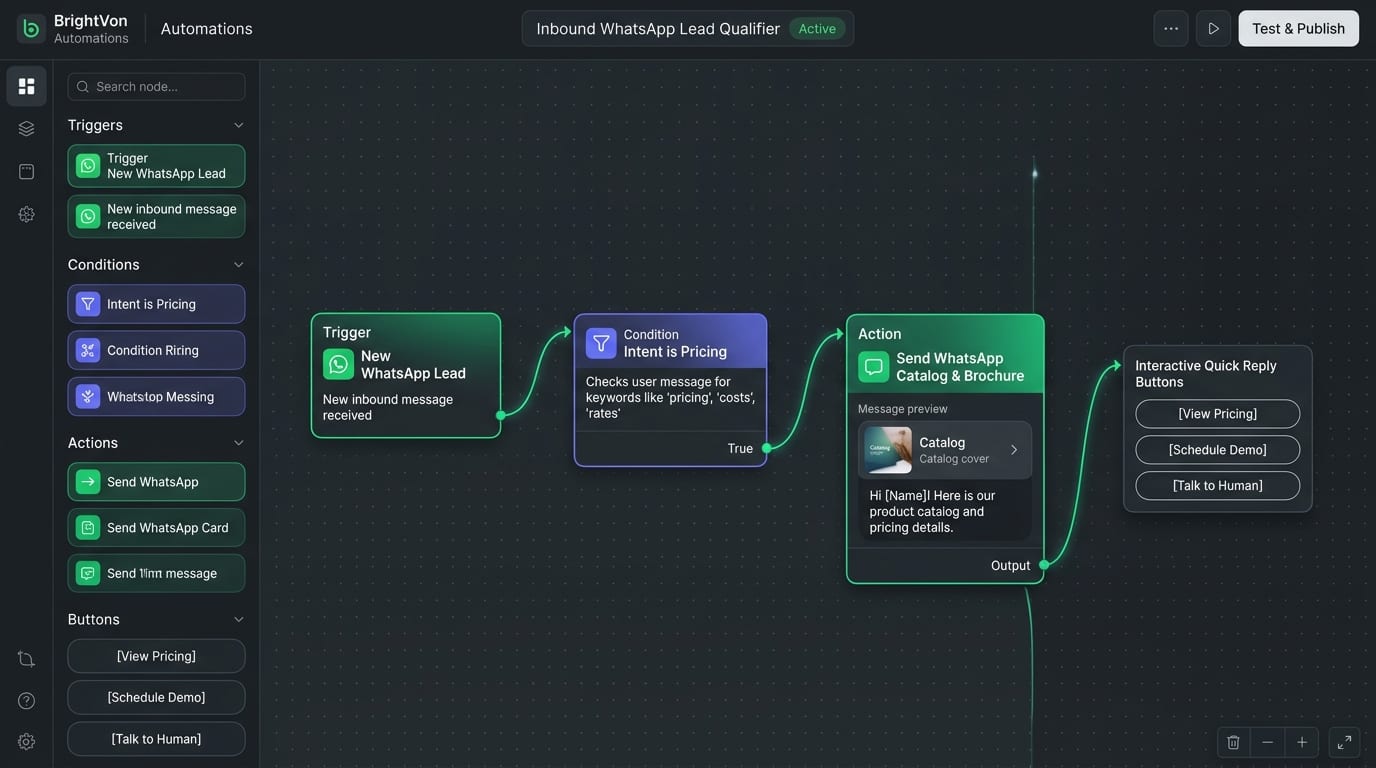
Drag triggers, actions, conditions, and delays onto a canvas. Connect them and deploy in one click.
AI Chatbot Builder
Train a bot on your FAQs, products, and policies. It answers in natural language, 24/7.
Smart Scheduling
Delay steps, send at optimal times, respect business hours, and pause for weekends — automatically.
API & Webhook Triggers
Fire workflows from any event in your stack — orders, signups, payments, custom events.
CRM & Data Sync
Read from and write to HubSpot, Salesforce, Shopify, and 40+ tools — inside every workflow.
Human Handoff Rules
Decide exactly when a bot hands off to a person — by intent, sentiment, keyword, or time spent.
Workflow Analytics
See completion rates, drop-offs, response times, and ROI for every workflow you build.
From trigger
to live in minutes.
Four steps from idea to deployed automation. No code, no deploy pipeline, no waiting on engineering.
Pick a trigger
Choose from 20+ built-in events or fire from your own webhook.
Add actions
Send messages, update CRM, assign agents, call APIs — all from one panel.
Add conditions
Branch on replies, tags, values, or any custom attribute.
Test & publish
Preview the whole flow with a test contact, then set live with one click.
50+ automations, ready to use
Start from a template or build from scratch. Every recipe is a When/Then workflow you can customize in minutes.
Welcome Series
Abandoned Cart
Order Confirmation
Appointment Reminder
Feedback Request
Lead Nurture
Re-engagement
Smart Routing
Webhook Sync
Connects with your entire stack
Three steps to your first automation
Everything you need to go from zero to deployed in a single session.
Start Growing on WhatsApp
Go from your first message to your next customer
Connect
Set up your WhatsApp Business connection.
Create
Build campaigns, chatbots, and automated workflows.
Launch
Start engaging your customers.
Grow
Track results and optimize your conversations.
We automated 70% of our support volume in the first week. Our agents now only handle the conversations that actually need a human.
Automate your first workflow today
Start free. Build in minutes. No credit card required.